 ProblemPick
How to Stop Losing Remote Controls
Give every active remote one visible home beside the place it is used. Choose a sofa-arm caddy for a fixed seat, a tabletop holder for a shared room, a wall pocket when surfaces are crowded, a finder tag for the one remote that still wanders, or a compatible universal remote when too many controls are the real problem.
Protect devices and furniture: Keep holders away from recliner tracks, vents, heaters, outlets and walkways. Use only surface-compatible mounting methods and never cover sensors or battery doors. The U.S. Consumer Product Safety Commission says products with accessible button or coin batteries should be kept away from children when the compartment is not securely closed.
Why does the remote control keep disappearing?
Most remotes are lost at a transition: someone puts one on a blanket, carries it to another seat, balances it on a sofa arm or leaves it among other objects on a table. Look at the last three places where you found it. The pattern tells you whether the room needs a reachable pocket, a shared landing zone, a fixed vertical holder or a finder.
Separate active controls from backups. A remote used every day should not share a deep box with spare cables, manuals or old devices. Label and store inactive originals elsewhere, but keep them available if a universal remote still needs them for setup or uncommon functions.
If house keys disappear during a different part of the day, use the separate guide to choose a key tray, hook rack, cabinet, bag clip or finder around the arrival routine.
Diagnose the loss pattern before buying anything
| Where it is usually found | Likely cause | Two-day no-purchase test | Escalate to |
|---|---|---|---|
| Between the same sofa cushions | The remote has no reachable landing place at the main seat. | Place a shallow open container beside that seat and return the remote before standing. | A shallow armrest caddy if the test works but the temporary container is unstable. |
| Under blankets or magazines | The landing zone is horizontal, covered or shared with clutter. | Move an empty tray above the pile line and keep the area around it clear. | A visible tabletop holder with one compartment per active remote. |
| In another room | The remote is being carried during a transition. | Add a clearly labeled return point at the viewing-room exit and pause there before leaving. | A finder only if the remote still travels after the return cue is used consistently. |
| Beside several similar controls | Too many active remotes make ownership and return positions unclear. | Label each remote and its matching slot; store inactive originals separately. | A compatible universal remote only after every required device function is verified. |
The test matters because a product cannot repair the wrong failure. A caddy will not stop a remote being carried to the kitchen, and a finder will not make an oversized shared tray easier to reset.
What should you check before buying a remote organizer?
The best location is not always the closest one. It must be easy to see and easy to reset. Test a temporary tray or open container in the proposed position for several days before committing to adhesive mounting or a larger organizer.
Which products help keep remote controls from getting lost?
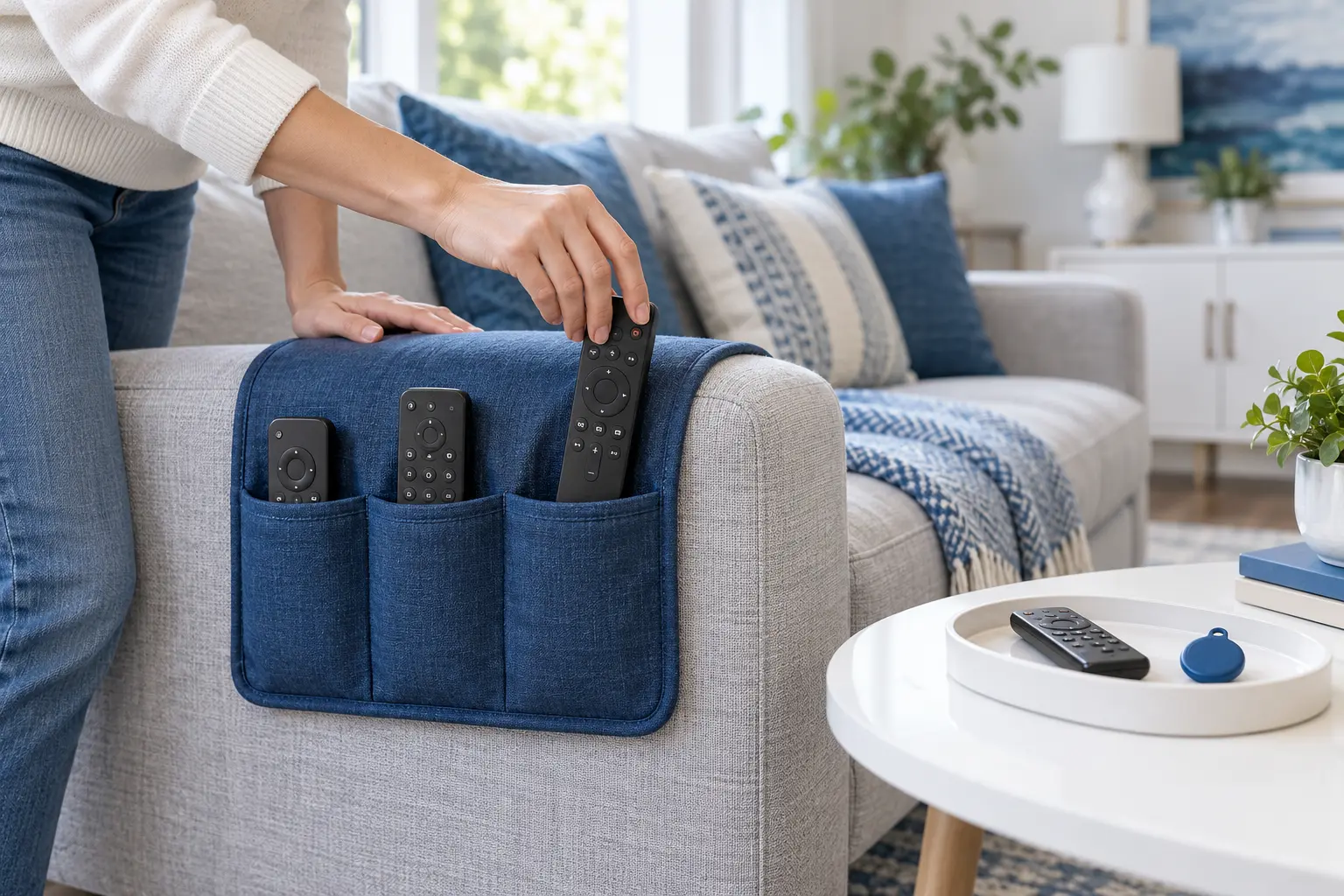
Sofa-arm remote caddy
Best when remotes disappear between sofa cushions and viewers usually sit in the same placeA weighted or tucked armrest caddy keeps several remotes visible beside the seat. Separate pockets can give the television, streaming device and sound system their own positions without using coffee-table space.
- Benefits
- Keeps remotes within seated reach
- Uses otherwise empty arm space
- Separates several controls
- Check before buying
- Measure the arm width, pocket depth and the caddy's anchoring section. Confirm that it suits the upholstery and does not cover recliner controls, heating, charging ports or moving sections. Check wash instructions and whether the backing may mark delicate fabric or leather.
- Possible drawback
- It can slip on rounded arms, look bulky or collect crumbs. Deep pockets hide small remotes, and a caddy is inconvenient when people regularly change seats.
Tabletop compartment holder
Best when the coffee table or media console is the natural handoff point for everyoneAn upright holder or divided tray creates one visible landing zone. It works well when people can comfortably return a remote after use and the surface already has a safe, uncluttered corner.
- Benefits
- Easy to see from across the room
- Simple for several users to share
- No installation or batteries
- Check before buying
- Count the remotes and measure their height, width and thickest point. Compare the holder's internal dimensions, base footprint and stability. Choose smooth compartments that do not press buttons and a base that will not scratch the table finish.
- Possible drawback
- It consumes surface space and only works when users consistently return remotes. A tall narrow holder may tip, while an oversized tray can become another miscellaneous drop zone.
Wall or furniture-side remote pocket
Best when tables are crowded or a fixed home beside the television or favorite chair is easier to rememberA slim pocket mounted to an approved wall or furniture side keeps the remote off horizontal surfaces. A fixed location can be especially useful in small rooms where objects are often moved during cleaning.
- Benefits
- Uses vertical space
- Creates a memorable fixed location
- Keeps tables clear
- Check before buying
- Choose the exact location before buying and confirm that every intended user can reach it safely. Check the permitted mounting method, surface material, removal instructions and pocket depth. Keep it clear of vents, cables, outlets, doors and furniture mechanisms.
- Possible drawback
- Adhesive can leave residue or damage paint and veneer; screw mounting alters the surface. A poorly placed pocket may be hard to reach or may let the remote fall when bumped.
Remote finder tag and receiver
Best when one small remote still wanders despite having an assigned storage spotA compact tag attached with the maker-approved method can sound when its matching button or app command is used. It helps locate a remote under a blanket or in another room; it does not replace the habit of returning it.
- Benefits
- Helps locate a misplaced remote
- Can support several labeled items
- Adds little room clutter
- Check before buying
- Measure the remote and check whether the tag blocks the battery cover, sensor, microphone or buttons. Compare receiver type, audible alert controls, range stated by the maker, battery format, replacement process and app permissions if a phone is required.
- Possible drawback
- Tags add weight and need batteries or charging. Sound may be too quiet under thick cushions, app-based models may need an account or permissions, and the receiver itself needs a fixed home.
Compatible universal remote
Best when several device remotes create confusion and the main functions can be consolidated safelyA universal remote can reduce the number of controls that must be stored and returned. It is most useful for common television, streaming and audio functions when the supported device list and setup method are clear.
- Benefits
- Can reduce the number of active remotes
- Creates one familiar control layout
- May simplify a shared viewing area
- Check before buying
- List every device brand and model plus the functions you actually use. Confirm infrared, radio or Bluetooth compatibility, code availability, input switching, volume control, accessibility features and whether original remotes are still needed for setup or advanced menus.
- Possible drawback
- Compatibility is never automatic. Some voice, pointer, smart-home or menu functions may be missing, setup can take time, and the original remotes still need labeled storage as backups.
ProblemPick compares product types, not current offers. Amazon shows products, prices, ratings, availability and seller terms only after you choose to open a link.
Quick comparison: which remote-control solution fits?
| Product type | Best use | Main limitation |
|---|---|---|
| Sofa-arm remote caddy | Best when remotes disappear between sofa cushions and viewers usually sit in the same place | It can slip on rounded arms, look bulky or collect crumbs. Deep pockets hide small remotes, and a caddy is inconvenient when people regularly change seats. |
| Tabletop compartment holder | Best when the coffee table or media console is the natural handoff point for everyone | It consumes surface space and only works when users consistently return remotes. A tall narrow holder may tip, while an oversized tray can become another miscellaneous drop zone. |
| Wall or furniture-side remote pocket | Best when tables are crowded or a fixed home beside the television or favorite chair is easier to remember | Adhesive can leave residue or damage paint and veneer; screw mounting alters the surface. A poorly placed pocket may be hard to reach or may let the remote fall when bumped. |
| Remote finder tag and receiver | Best when one small remote still wanders despite having an assigned storage spot | Tags add weight and need batteries or charging. Sound may be too quiet under thick cushions, app-based models may need an account or permissions, and the receiver itself needs a fixed home. |
| Compatible universal remote | Best when several device remotes create confusion and the main functions can be consolidated safely | Compatibility is never automatic. Some voice, pointer, smart-home or menu functions may be missing, setup can take time, and the original remotes still need labeled storage as backups. |
Which option fits the room and the way the remote gets lost?
Does the remote fall into the sofa?
Choose a shallow armrest caddy that keeps the remote above the cushion line. Confirm it stays clear of moving seat parts and that its backing suits the upholstery.
Do several people use several remotes?
Use a stable tabletop holder with one obvious compartment per active control. Put it where everyone can return a remote without crossing the room.
Is every table already crowded?
A fixed wall or furniture-side pocket can preserve surface space. Test the reach first and use only a mounting method permitted for that finish.
Does one tiny remote travel between rooms?
Add a finder tag only after choosing a home for the remote. Keep the receiver in a labeled location and include battery checks in the household routine.
Are too many remotes creating the confusion?
Compare a universal remote against the exact device list and functions. Consolidate only what it can control reliably and store the labeled originals as backups.
How do you make the new remote-control home stick?
If the whole sofa setup needs attention, first stop couch cushions from sliding. For a smaller nighttime landing zone, use the guide to reduce clutter on a bedside table. Browse more Home guides and Tech guides.
Remote-organizer buying checklist
Sources and research method
This guide compares solution types from room layout, loss pattern, product instructions and safety guidance; it does not claim hands-on testing. Safety checks use the CPSC button- and coin-battery guidance. End-of-life guidance follows the U.S. EPA household-battery guide: identify the battery type and follow the appropriate local recycling or waste route rather than assuming every battery belongs in the same bin.
Remote-control organization FAQs
Where should I keep TV remotes so they do not get lost?
Choose one location beside the main viewing seat or on the route people naturally take when leaving the room. It should be visible, easy to reach and large enough for every active remote. A sofa-arm caddy suits a fixed seat; a tabletop holder suits a shared room.
How do I stop a remote falling between sofa cushions?
Keep it above the cushion line in an armrest caddy or nearby fixed holder. Before adding any product, check the sofa gap and recliner mechanism. Do not wedge a tether, magnet or holder into moving furniture parts.
Is a remote finder tag worth it?
It can help when one small remote still disappears after you create a storage routine. Check size, attachment method, alert volume, batteries and any app permissions. A finder is less useful if its receiver or phone is also hard to locate.
Can I attach a remote holder to a wall or sofa?
Only use a mounting method approved for that exact surface. Adhesive can mark paint, wood finishes, fabric or leather, while screws permanently alter a wall or furniture panel. Test removal instructions and keep clear of wiring and mechanisms.
Should I replace several remotes with one universal remote?
Consider it when the universal model explicitly supports all essential devices and functions. Keep the original controls labeled and stored because setup, troubleshooting, voice features or advanced menus may still require them.
How many compartments should a remote organizer have?
Use one accessible compartment per active remote, with a little clearance for easy removal. Extra empty sections tend to collect unrelated items. If the household uses only one remote, a simple tray or single pocket is usually clearer than a large organizer.